
















Online compass in browser: how to find north and why the needle errs
An online compass turns your phone into a navigation instrument in just a couple of seconds. In an unfamiliar city, you open a browser instead of digging through your backpack for a magnetic compass. In a smartphone, direction is handled by the magnetometer: it reads the Earth's magnetic field and converts it into a rotation angle. Below, we'll look at how a digital compass works in a browser, where it helps while traveling, and why it sometimes gives wrong readings.
What is an online compass
💡 In short:
- An online compass works as a digital equivalent of a magnetic compass that opens right in your phone's browser.
- No installation or registration needed: you open the page and immediately see the cardinal directions.
- How a compass gets direction in a browser: 10/2026, verified on MDN Web Docs.
This is a web tool that shows the cardinal directions on your phone's screen. It doesn't need a separate device: the direction is calculated by the phone's built-in sensor. This kind of compass distinguishes the four main directions and the intermediate directions between them. That's enough for orientation, although it doesn't replace a full map.
A regular magnetic compass relies on a magnetized needle. A digital one uses data from the phone's magnetometer instead of a needle. The difference shows in the details: the screen is visible in the dark, and large digits are readable without glasses. On the other hand, the digital version depends on the phone's battery and working sensors. You don't need to buy anything or carry a separate device.
Freecompass.online service: a compass right in your browser
The freecompass.online service works as an online compass that opens right in your phone's browser with no installation or registration (according to the service description, 10/2026). The page shows your current direction, as well as latitude and longitude if you've allowed location access. According to the service description, the interface is available in several languages, and separate instructions for accessing sensors are provided for iPhone and Android.
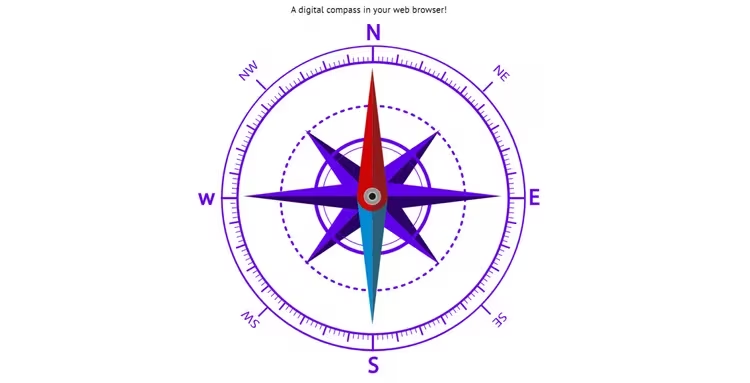
The service shows both main and intermediate directions: north, south, west, east, and their combinations. The red arrow marker, just like on a mechanical compass, points north. Separate sections of the site explain how to read the compass and why it might not start. If you need a quick reference point, the service responds to your request in seconds.
Don't expect routes from the service: it doesn't draw a map, it only shows direction. If you need a path between streets, the compass works together with maps. That's why an online compass is more often used as a quick auxiliary tool rather than a replacement for a navigator.
How a digital compass finds north
In a browser, direction is provided by the device orientation event. According to MDN documentation, this data is collected by the magnetometer inside the phone. The magnetometer measures the Earth's magnetic field, and the page converts it into a rotation angle.
There's a nuance with absolute and relative direction. One event gives an angle relative to the position in which you opened the page, while another gives it relative to true north. For a compass, the second one matters, so some browsers require explicit permission to access sensors. Without permission, the arrow either stays silent or points the wrong way.
Phones have different hardware, and accuracy varies too. One device has a more sensitive magnetometer, another has a cheaper and noisier one. That's why the same service on two phones can give different results. Below, we'll look at how to reduce the error yourself.
Where an online compass helps while traveling
When traveling, a compass is useful where a map goes silent. You step out of the metro onto an unfamiliar square and don't know which way to go. The arrow on your phone answers in seconds, without digging through settings and without a separate device.
Ad: this article contains affiliate links: we earn a commission if you book through them, at no extra cost to you.
The compass itself shows direction even without a network, but the maps and routes around it work online. Abroad, it's more convenient to connect a travel eSIM than to pay roaming charges to your carrier. Then navigation and translation work on one phone.
The compass also helps outside the city. On a hike, it tells you which way to leave the forest toward a road. At a viewpoint, the arrow shows where north is so you can catch the right light for a shot. In an old town with winding alleys, it's easy to walk an extra loop without a compass.
There's a limitation too: the compass shows direction, but not distance or a route. If you're looking for a specific address, you'll still need a map. Think of the compass as a supplement to it, not a replacement.
How to improve accuracy: calibration and common mistakes
The accuracy of a digital compass depends on calibration and interference. Check a few things before trusting the arrow.
- Hold the phone horizontally. According to the service description, tilting the device throws off the readings, so lay the phone flat.
- Remove sources of interference. Magnets, metal objects, speakers, and electronics nearby distort the magnetic field.
- Allow access to motion and orientation sensors. Without it, some browsers don't provide data, and the compass won't start.
- Cross-check the readings. If the arrow freezes or jumps around, open a third-party compass app and compare the angle.
It's also worth remembering about calibration in motion. According to the service description, a thrown-off arrow is often fixed by simply moving the phone in a figure-eight pattern. Repeat it several times in an open area, away from cars, wires, and iron fences.
If the compass still lies, the service isn't always to blame. A cheap phone with a basic magnetometer and a case with a metal plate together produce enough error that the arrow confidently points in a completely different direction from where you're going. In dense urban areas, cross-check with a map and the sun, and treat the arrow as a reference rather than a precise instrument.
⁉️🤔 Frequently asked questions
Do you need internet for an online compass?
The arrow gets its direction from the phone's sensors, so the arrow itself works without a network. Internet is needed to open the page and load nearby maps. Abroad, connect an eSIM in advance, so navigation doesn't depend on your carrier's roaming. In the metro and underground, maps may not load, but the compass will keep showing the cardinal directions.
Does an online compass work without installing an app?
Yes. An online compass opens right in your phone's browser, with no installation or registration needed. The freecompass.online service shows direction immediately after opening. The browser may ask for access to motion and orientation sensors; without it, the arrow won't work. If the arrow doesn't appear, check permissions and whether the device has a magnetometer.
Why does the compass show the wrong direction?
Most often, calibration is off or there's a source of interference nearby. Remove magnets, metal, and electronics, hold the phone horizontally, and allow sensor access. A weak magnetometer in a cheap phone also produces noticeable error. In dense urban areas, cross-check with a map and the sun, and treat the arrow as a reference.
Can you use the compass on a plane or on a hike?
Yes, the compass shows direction even where there's no network. On a hike, it helps you get back to a road, and at a viewpoint it tells you where north is. For serious routes, take a separate compass: your phone's battery may run out. Internet on a plane is also usually unavailable, but the compass doesn't depend on it.
How is a digital compass different from a mechanical one?
A mechanical one works with a magnetized needle and doesn't depend on a battery. A digital one calculates direction using the phone's magnetometer, is visible in the dark, and its interface is available in different languages. On the other hand, a mechanical compass is more reliable where your phone has died. For a short walk, a digital one is enough; for a long route, it's better to take both.
In short: how to use an online compass
An online compass helps you quickly figure out where north is when all you have is a phone. Open the service in a browser, allow sensor access, and hold the phone horizontally. Remove magnets and metal nearby, otherwise the arrow will drift. Figure-eight calibration often restores accuracy in an open area.
Before a trip, settle two things: how you'll orient yourself and how you'll get internet abroad. For a short city walk, a compass and an offline map are enough. For a long route, connect an eSIM for navigation in advance so maps work without roaming.

A small editorial team writing guides for independent travel. We travel ourselves, but we haven’t been everywhere, so we check prices, opening hours and how to get there against official sources.